ARGB and RGB lighting connections
5V ARGB vs 12V RGB: check the lighting header before buying fans
Use MSI’s documented lighting headers to check voltage and pin definitions, distinguish a fan’s motor plug, and understand why an adapter needs its own compatibility evidence.
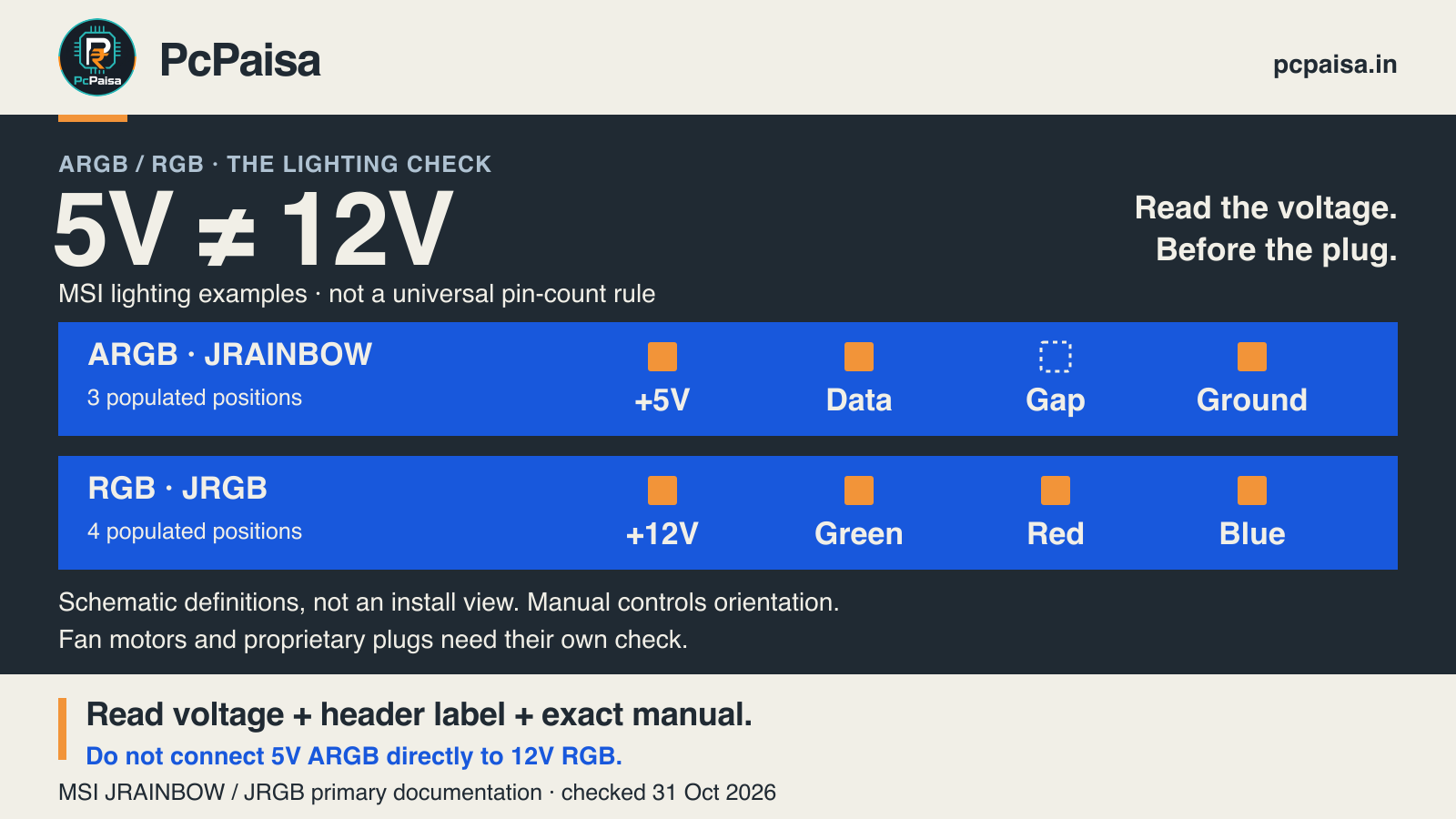
A 5V ARGB lighting lead should not be connected directly to a 12V RGB header. Before buying illuminated fans, a light strip or an adapter, read the exact device and motherboard manuals. Match the lighting voltage and connection standard as well as the connector shape.
A historical PC-builder question illustrates the confusion: an AIO’s lighting lead has three pins, while the motherboard’s RGB header has four. Counting pins identifies a question to investigate; it does not establish the answer for every connector.
Start with a documented lighting-header example
MSI’s installation guide, dated 21 September 2022, defines JRAINBOW as 5V/3-pin and JRGB as 12V/4-pin. Its Mystic Light FAQ supplies the pin definitions:
| MSI lighting example | Documented positions | What the labels mean |
|---|---|---|
| JRAINBOW — 5V, 3-pin | 5V / D / — / G | Supply / Data / gap / Ground |
| JRGB — 12V, 4-pin | 12V / G / R / B | Supply / Green / Red / Blue |
The two G labels mean different things. On the RGB row, G is the green colour channel. On the ARGB row, G is ground. The diagram above is a comparison of definitions, not an installation orientation: locate pin 1 and the correct alignment in your exact board’s manual.
The voltage difference matters. MSI explicitly warns that a 5V LED strip connected to JRGB will be damaged. Phanteks independently explains that typical 5V digital/ARGB and 12V RGB lighting are not interchangeable. A cable that changes the physical plug shape is not evidence that the electrical connection is suitable.
Separate the fan’s motor lead from its lighting lead
An illuminated fan can have two different connection jobs. One powers and controls rotation; another powers and controls the lights.
For a concrete example, ARCTIC’s P12 PWM PST A-RGB 0dB white specification sheet, page 1 documents a 4-pin, 12V PWM motor connection separately from a 3-pin, 5V lighting connection. These are manufacturer specifications for that exact fan family, not PcPaisa measurements or approval of a particular board pairing.
A four-pin motor plug is not thereby a four-pin RGB lighting plug. Identify which lead you are holding before choosing the header or a hub. A successful motor connection also does not establish that the lighting connection is correct.
Four pins do not always mean 12V RGB
Proprietary connectors are another reason to read the documentation. NZXT’s 5V ARGB versus 12V RGB guide, dated 17 August 2026, identifies its proprietary four-pin NZXT RGB connection as 5V digital lighting.
That does not make it directly compatible with an unspecified three-pin ARGB header. It shows why the rule “four pins means 12V RGB” is too broad. Use the exact device’s supported controller, cable and connection instructions instead of transferring another brand’s diagram to it.
Can a converter or separate controller solve the mismatch?
Sometimes a documented product can provide a supported route. DeepCool’s RGB convertor, DP-FRGB-CHUB5-12V, is a manufacturer-described example of connecting 5V ADD-RGB equipment through a converter to a 12V RGB motherboard. It has SATA power and conversion electronics; the manufacturer also notes unsupported rainbow/breathing modes on some motherboards.
This is different from assuming that any adapter cable performs the necessary conversion. Check the exact converter’s input, output, power connection, device support and effect limitations. A standalone lighting controller is another category to investigate when the motherboard lacks the required header. We have not checked current Indian stock or prices, tested this converter, or approved an arbitrary hub/device combination.
Put four details on the purchase or build quote
- Exact device: full fan, light-strip or AIO model, including the supplied lighting lead and any required proprietary controller.
- Connection job: motor/control lead or lighting lead; keep those paths distinct.
- Documented match: motherboard header label, voltage, pin definitions and alignment from its manual.
- Power and control path: the exact hub/controller/converter, its power source, supported devices and electrical/LED limits.
Follow MSI’s instruction to turn off power before installing or removing RGB/ARGB equipment, along with the relevant device’s own installation guidance. Never force a connector or test an uncertain voltage match by powering it on.
For the buying decision, choose a documented compatible lighting device or a documented controller/conversion route. Ask the assembler: “Which lighting header or controller will this exact device use, and where is that connection supported?” That answer is more useful than “it has RGB.”
Primary documents checked 31 October 2026. Header names and wiring above have the stated manufacturer scope. This is a documentation comparison, not a hardware installation test or a complete-build compatibility certification.
Put your shortlist to work
Catch a price drop on your next PC part.
Follow our Telegram channel for selected Indian PC-part price-drop alerts from PcPaisa’s tracked price history.
Join Telegram deal alerts