Motherboard fan-header current and splitters
How many fans can one motherboard header power? Check current before buying a splitter
Four 120mm fans can total 0.56A or 1.20A. Use exact fan maximum-current specs and the motherboard manual, then check the splitter or powered hub.
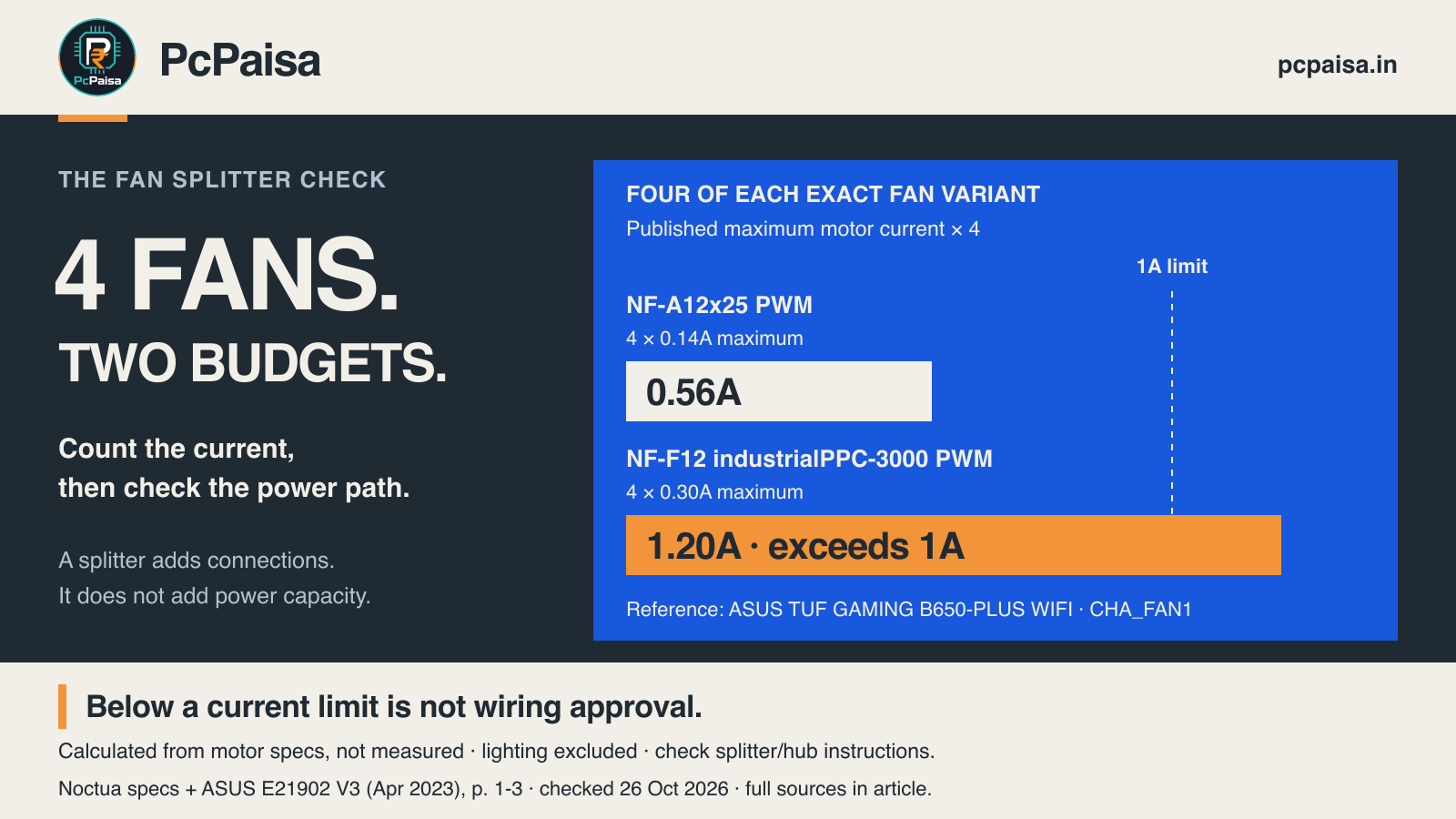
There is no universal fan count for a motherboard header. Before buying a splitter, find the exact header’s current limit and add the maximum input currents of the fans it would power. A spare connector is not evidence of spare electrical capacity.
Noctua’s multi-fan FAQ instructs builders to keep the combined maximum fan current below the header’s specified limit. Use the manual for your exact board and header; do not assume every connector has the same rating.
A historical r/buildapc question asks what happens when three radiator fans share one splitter and fan curve. It illustrates a real buying question, not how common it is. We use manufacturer documentation for the electrical checks below, rather than the thread’s replies.
Same fan count, different current budget
The ASUS TUF GAMING B650-PLUS WIFI manual lists CHA_FAN1 at 1A and 12W. That is the reference header for this comparison, not a universal motherboard limit. The document is E21902, Revised Edition V3, April 2023, printed page 1-3. ASUS manual
Both exact Noctua variants below are specified as 120 × 120 × 25mm, 12V, 4-pin fans. Their electrical requirements differ:
| Exact fan variant | Manufacturer maximum input current per fan | PcPaisa calculation for four fans | Compared with the reference 1A header limit |
|---|---|---|---|
| NF-A12x25 PWM | 0.14A | 4 × 0.14A = 0.56A | Below the limit on this arithmetic check; further checks still required |
| NF-F12 industrialPPC-3000 PWM | 0.30A | 4 × 0.30A = 1.20A | Exceeds the limit; reject this direct header-powered arrangement |
Sources: NF-A12x25 PWM specifications, NF-F12 industrialPPC-3000 PWM specifications, checked 26 October 2026. The industrial fan is included to show the electrical contrast, not as a quiet-PC recommendation.
These totals are calculations from published specifications, not measured operating or startup currents. Four is a controlled comparison, not a recommended number of fans per header. The 0.56A result clears only this maximum-current arithmetic check; it does not approve an unspecified splitter, hub or complete build.
Use the maximum figure where the manufacturer provides one. For example, the NF-A12x25 PWM page also lists a typical current of 0.10A; substituting that would understate the specified maximum. The opened fan pages do not provide a separate startup-current waveform. We have not measured one or established an extra safety margin. If a different fan’s documentation gives only a typical/rated value, resolve its maximum/startup requirements with the manufacturer before treating the budget as complete.
A powered hub changes the power path
A passive splitter does not add a separate power supply. A hub with an external power input can route motor power differently, but its exact instructions matter. Noctua says the NA-FH1 uses SATA power when that connection is present. Its hub guide also recommends the extra SATA connection when more than three fans share a motherboard header in the NA-FH1/NA-FC1 setup.
That recommendation is a good reason not to turn the table’s 0.56A into permission to connect four fans through any cable. Check the selected device’s total and per-port limits, required power connections and fan compatibility. A hub’s socket count alone does not establish capacity.
Control is another limit. The same Noctua guide explains that fans on the NA-FH1 share the incoming PWM duty cycle and cannot be controlled individually. Different fan models need not run at the same RPM. More sockets therefore do not necessarily give you more independent fan curves.
Lighting needs its own check. The ASUS manual documents the fan headers separately from 5V addressable lighting and 12V RGB lighting headers. This article’s current table covers the two specified fan motors only; it does not approve a lighting connection or add lighting capacity to a fan header. ASUS manual, printed pages 1-3 to 1-5
What to ask before paying for a fan upgrade
For an Indian PC quote or an upgrade to an existing case, ask the assembler to record these details:
| Check | Record with the quote |
|---|---|
| Motherboard | Exact model/revision, chosen header and its documented current/power limits |
| Fans | Exact variant, quantity and manufacturer maximum-current source; resolve missing startup information where needed |
| Connection | Splitter or hub model, relevant limits and whether motor power comes from the board or an external connection |
| Control and lighting | Which fans share control, and the separate lighting connector and limits if used |
The strongest argument for a splitter is reasonable: several low-current fans may fit within a documented header budget, so a powered hub is not automatically necessary. But the evidence is the exact parts and instructions, not “three fans is always fine” or “four connectors means four fans are supported.” If the required information is missing, leave the arrangement unapproved until it is resolved.
Primary documentation checked on 26 October 2026. This is a two-fan-variant specification comparison and buying checklist. No current price, stock, cooling/noise benchmark, firsthand hardware test or complete-build compatibility verdict is asserted.
Put your shortlist to work
Catch a price drop on your next PC part.
Follow our Telegram channel for selected Indian PC-part price-drop alerts from PcPaisa’s tracked price history.
Join Telegram deal alerts